Why Node.js is Perfect for Building Fast Web Applications
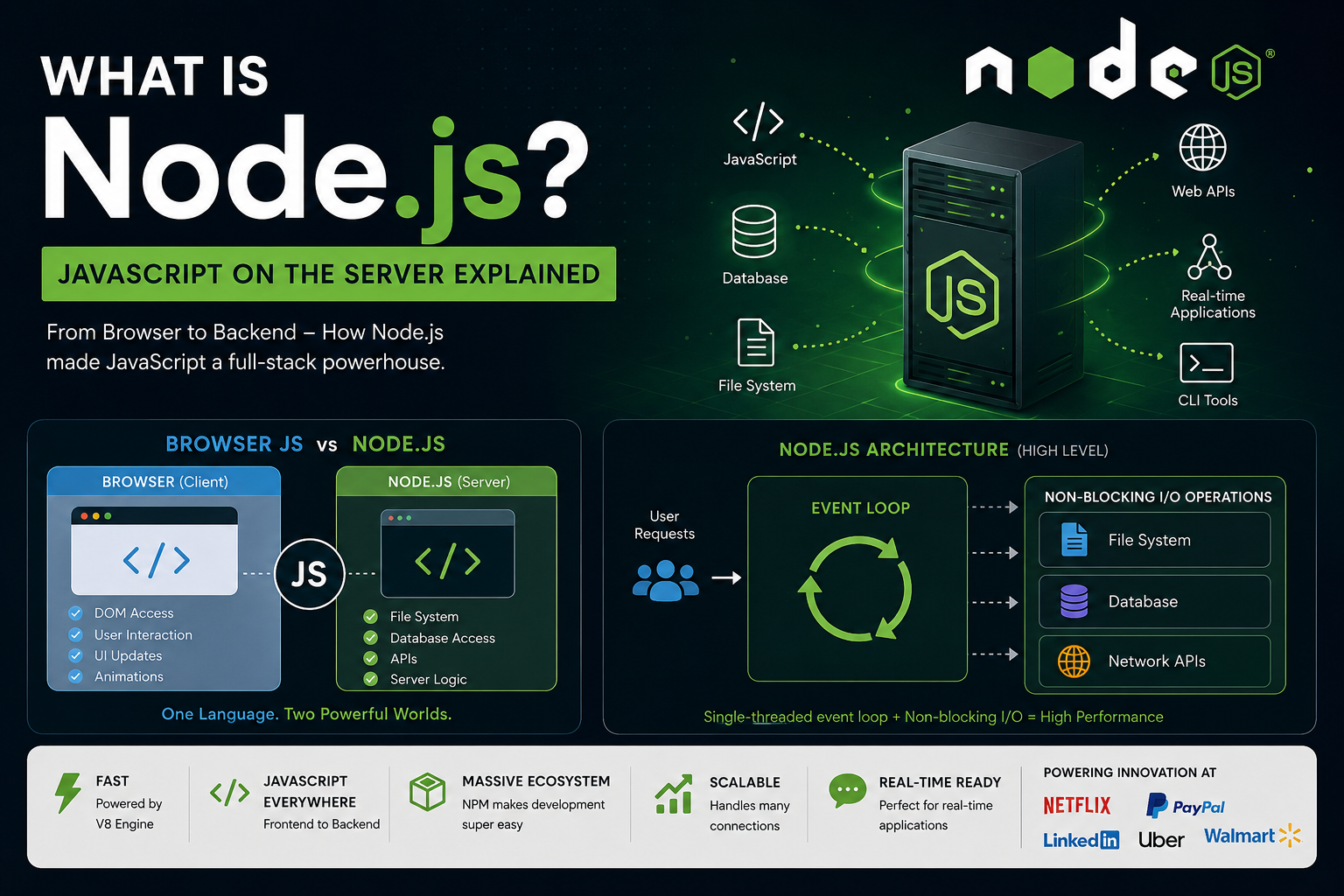
Speed, scalability, and real-time performance — this is why modern developers love Node.js.
Introduction
Modern web applications are expected to be:
Fast
Responsive
Scalable
Real-time
Users do not want slow-loading pages or delayed responses.
Whether it is:
Chat applications
Video streaming
Online gaming
Food delivery apps
Real-time dashboards
speed matters.
This is one of the biggest reasons Node.js became so popular.
Node.js is designed to handle many requests efficiently while maintaining high performance.
In this blog, we will understand:
What makes Node.js fast
Non-blocking I/O
Event-driven architecture
Single-threaded model
Concurrency vs parallelism
Real-world use cases
Why companies choose Node.js
What Makes Node.js Fast?
Node.js is fast because of several important design choices:
V8 JavaScript Engine
Non-blocking I/O
Event-driven architecture
Single-threaded event loop
Asynchronous processing
Instead of waiting for one task to finish before starting another, Node.js handles multiple operations efficiently.
This makes it ideal for modern web applications.
The V8 Engine Advantage
Node.js uses Google Chrome’s V8 JavaScript Engine.
The V8 engine:
Converts JavaScript into machine code
Optimizes execution
Runs code very quickly
This gives Node.js excellent performance compared to traditional interpreted scripting environments.
Understanding Blocking vs Non-Blocking
To understand Node.js performance, we first need to understand:
Blocking operations
Non-blocking operations
Blocking Request Handling
In traditional blocking systems:
A request arrives
Server processes it completely
Only then moves to next request
This creates waiting time.
Example
Imagine a restaurant waiter.
Blocking Model
The waiter:
Takes one customer order
Waits in kitchen
Delivers food
Then handles next customer
Other customers must wait.
This slows everything down.
Diagram Idea: Blocking Server
Request 1 ---> Processing ---> Response
                     |
                     v
Request 2 ------ WAITING ------
                     |
                     v
Request 3 ------ WAITING ------
Non-Blocking Request Handling in Node.js
Node.js uses a non-blocking model.
Instead of waiting for one operation to finish, Node.js continues handling other requests.
Restaurant Analogy
The waiter:
Takes many orders quickly
Gives them to kitchen
Serves customers when food is ready
No customer blocks the entire restaurant.
This is exactly how Node.js works.
Diagram Idea: Node.js Non-Blocking Flow
Request 1 ---> Processing Async
Request 2 ---> Processing Async
Request 3 ---> Processing Async

Responses return whenever tasks complete
What is Non-Blocking I/O?
I/O means:
- Input/Output operations
Examples:
Reading files
Database queries
API calls
Network requests
Traditional systems often block while waiting for these operations.
Node.js does not.
Example of Blocking Code
const data = readFileSync("data.txt");

console.log(data);

console.log("Finished");
Here:
- Program waits until file reading finishes
Execution stops temporarily.
Example of Non-Blocking Code
const fs = require("fs");

fs.readFile("data.txt", "utf8", (err, data) => {
  console.log(data);
});

console.log("Finished");
Output:
Finished
(file content appears later)
Node.js continues execution without waiting.
This improves performance significantly.
Event-Driven Architecture
Another reason Node.js is fast is its event-driven architecture.
Node.js listens for:
Requests
Events
User actions
Database responses
When an event happens:
- Node.js reacts immediately
This creates highly responsive applications.
Understanding Events
Examples of events:
User clicks button
API request arrives
Database query completes
File upload finishes
Node.js handles these events efficiently using an event loop.
The Event Loop
The event loop is the heart of Node.js.
It continuously checks:
Is there any task ready?
Is any operation completed?
Is any callback waiting?
Then it processes them efficiently.
Diagram Idea: Event Loop
          Incoming Requests
                  |
                  v
          +---------------+
          | Event Loop    |
          +---------------+
             /    |    \
            /     |     \
           v      v      v
      File APIs Database APIs Network APIs

Completed tasks return to Event Loop
Single-Threaded Model Explained
Many beginners think:
“Single-threaded means slow.”
But Node.js proves otherwise.
Traditional Multi-Threaded Servers
Traditional servers often:
- Create one thread per request
Problems:
High memory usage
Thread management overhead
Reduced scalability under heavy load
Node.js Single-Threaded Model
Node.js uses:
One main thread
Event loop
Async operations
Instead of creating multiple threads for every request, Node.js delegates heavy operations to the system and continues handling new requests.
This makes Node.js lightweight and efficient.
Concurrency vs Parallelism
These terms confuse many developers.
Concurrency
Concurrency means:
Handling multiple tasks at the same time conceptually.
Node.js is excellent at concurrency.
Example:
- Multiple users chatting simultaneously
Even with one thread, Node.js switches efficiently between tasks.
Parallelism
Parallelism means:
Multiple tasks literally running simultaneously on multiple CPU cores.
Traditional multi-threaded systems use more parallelism.
Simple Analogy
Concurrency
One chef:
- Cooking multiple dishes by switching between tasks
Parallelism
Multiple chefs:
- Each cooking separately at same time
Why Node.js Performs So Well
Node.js performs best in applications with:
Many simultaneous users
Frequent I/O operations
Real-time communication
Lightweight requests
Where Node.js Performs Best
1. Real-Time Chat Applications
Examples:
WhatsApp-like apps
Live chat systems
Customer support systems
Why Node.js?
Real-time messaging
Fast event handling
2. Streaming Applications
Examples:
Netflix-like platforms
Music streaming
Live streaming
Why Node.js?
Efficient data streaming
Non-blocking architecture
3. APIs and Microservices
Node.js is excellent for:
REST APIs
GraphQL APIs
Backend services
Because:
Lightweight
Fast response handling
4. Online Gaming
Games require:
Real-time communication
Fast updates
Low latency
Node.js handles these efficiently.
5. Collaboration Tools
Examples:
Google Docs-like editors
Shared dashboards
Live whiteboards
Node.js enables instant synchronization.
Real-World Companies Using Node.js
Many large companies use Node.js in production.
Netflix
Uses Node.js for:
Fast streaming services
Scalable backend systems
PayPal
PayPal reported:
Faster development
Better performance
Reduced response times
after adopting Node.js.
LinkedIn moved mobile backend systems to Node.js for improved scalability.
Uber
Uber uses Node.js for:
Real-time ride matching
Massive concurrent requests
Walmart
Walmart uses Node.js to handle high traffic during online sales events.
Why Developers Love Node.js
1. Same Language Everywhere
JavaScript on:
Frontend
Backend
This simplifies development.
2. Huge NPM Ecosystem
Node.js has millions of packages through NPM.
Example:
npm install express
This speeds up development dramatically.
3. Faster Development
Because developers use one language across the stack.
4. Scalability
Node.js handles many simultaneous connections efficiently.
Limitations of Node.js
Node.js is not perfect for every scenario.
CPU-Heavy Tasks
Node.js is less suitable for:
Video rendering
Heavy scientific calculations
Machine learning training
Because CPU-intensive tasks can block the event loop.
Best Use Cases
Node.js is best for:
I/O-heavy applications
Real-time systems
APIs
Streaming platforms
The Big Reason Behind Node.js Success
Node.js succeeded because modern web applications need:
Speed
Real-time interaction
Scalability
Efficient request handling
Traditional blocking systems struggled with these demands.
Node.js solved them using:
Non-blocking I/O
Event-driven architecture
Asynchronous processing
That changed backend development forever.
Conclusion
Node.js became one of the most popular backend technologies because it is designed for speed and scalability.
Its:
Event-driven architecture
Non-blocking I/O
Single-threaded event loop
Fast V8 engine
allow developers to build highly responsive web applications.
From chat apps to streaming platforms, Node.js powers many of the internet’s most demanding systems.
For modern real-time applications, Node.js is often the perfect choice.
Final Thoughts
Traditional servers wait.
Node.js keeps moving.
And in modern web development, that speed makes all the difference.
Tags
#NodeJS #JavaScript #BackendDevelopment #WebDevelopment #EventLoop #NonBlockingIO #AsyncProgramming #FullStackDevelopment