What is Node.js? JavaScript on the Server Explained
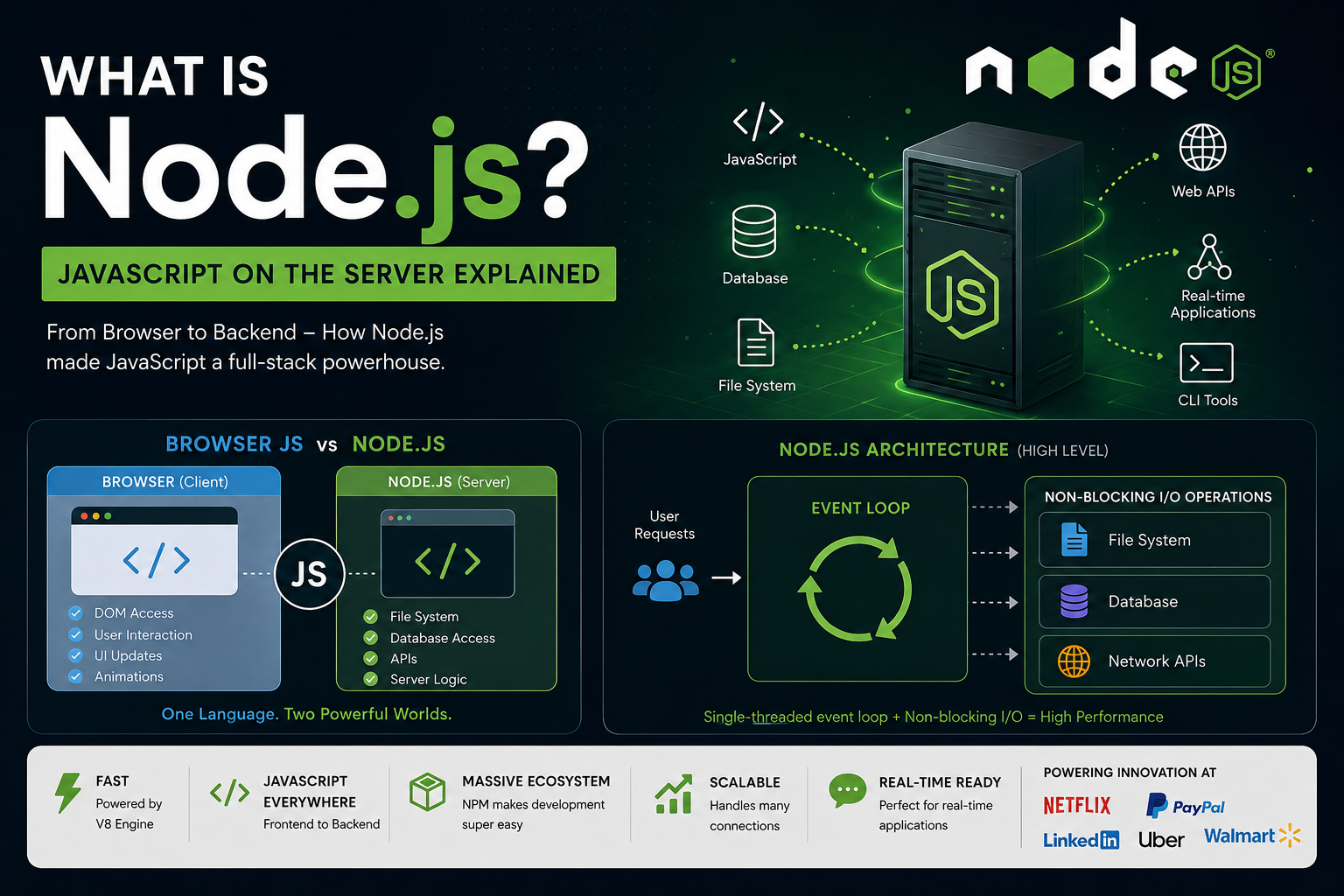
From browser-only scripting language to powering servers, APIs, real-time apps, and streaming platforms — this is the story of Node.js.
Introduction
Today, JavaScript is everywhere.
It runs:
In browsers
On servers
In mobile apps
In desktop applications
Even in IoT devices
But JavaScript was not originally designed for all this.
For many years, JavaScript could only run inside web browsers. Developers used different languages like PHP, Java, or Python for backend development.
Then Node.js changed everything.
In this blog, we will understand:
What Node.js is
Why JavaScript was originally browser-only
How Node.js enabled server-side JavaScript
What the V8 engine does
Event-driven architecture
Real-world use cases
Why developers rapidly adopted Node.js
What is Node.js?
Node.js is a JavaScript runtime environment that allows JavaScript code to run outside the browser.
In simple words:
Node.js lets developers use JavaScript to build backend servers and applications.
Before Node.js:
- JavaScript only worked inside browsers like Chrome or Firefox
After Node.js:
- JavaScript could run on servers, handle databases, create APIs, and power full-stack applications
Programming Language vs Runtime
Many beginners confuse JavaScript and Node.js.
They are not the same thing.
| JavaScript | Node.js |
|---|---|
| A programming language | A runtime environment |
| Defines syntax and logic | Executes JavaScript outside browser |
| Used to write code | Provides tools/APIs to run code |
| Standard language | Built on Chrome’s V8 engine |
Simple Analogy
Think of:
JavaScript as a car engine design
Node.js as the actual car that lets the engine run on roads
JavaScript provides the language.
Node.js provides the environment to execute it on servers.
Why JavaScript Was Originally Browser-Only
When JavaScript was created in 1995, its main purpose was simple:
Make web pages interactive.
Browsers needed a lightweight scripting language to:
Validate forms
Handle button clicks
Create animations
Update content dynamically
So JavaScript was embedded directly inside browsers.
For example:
button.addEventListener("click", () => {
  alert("Button clicked!");
});
This code depends on browser features like:
DOM
Window
Document
Browser events
Because of this, JavaScript could not directly:
Access files
Create servers
Connect databases
Handle operating system tasks
Backend development was handled by:
PHP
Java
Ruby
Python
ASP.NET
The Problem Before Node.js
Before Node.js, frontend and backend developers often used different languages.
Example:
| Frontend | Backend |
|---|---|
| JavaScript | PHP |
| HTML/CSS | Java |
| Browser code | Server code |
This created several challenges:
Developers had to learn multiple languages
Code sharing was difficult
Switching between frontend and backend slowed development
Companies wanted:
Faster development
Reusable code
One language across the stack
That opportunity led to Node.js.
How Node.js Made JavaScript Run on Servers
In 2009, Ryan Dahl introduced Node.js.
The main idea was:
Use Google Chrome’s powerful JavaScript engine outside the browser.
Node.js took the V8 engine from Chrome and added:
File system access
Network capabilities
HTTP handling
Operating system features
Now JavaScript could:
Create servers
Read/write files
Handle APIs
Work with databases
Example of a simple Node.js server:
const http = require("http");

const server = http.createServer((req, res) => {
  res.end("Hello from Node.js");
});

server.listen(3000);
This was revolutionary because JavaScript was no longer limited to browsers.
High-Level Overview of the V8 Engine
Node.js uses the V8 JavaScript Engine, developed by Google for Chrome.
What Does V8 Do?
V8 converts JavaScript code into machine code so the computer can execute it quickly.
Without V8:
JavaScript would be slower
Execution would require interpretation line by line
With V8:
JavaScript becomes highly optimized
Performance improves significantly
Important Note
Node.js is not the V8 engine itself.
Node.js = V8 engine + server-side capabilities
Browser JavaScript vs Node.js
Browser JavaScript
Browser JavaScript focuses on:
User interface
DOM manipulation
User interactions
Example:
document.getElementById("title").innerText = "Hello";
This only works in browsers.
Node.js JavaScript
Node.js focuses on:
Backend logic
APIs
Databases
File handling
Server operations
Example:
const fs = require("fs");

fs.readFile("data.txt", "utf8", (err, data) => {
  console.log(data);
});
This works in Node.js, not browsers.
Diagram Idea: Browser JS vs Node.js
+-------------------+        +-------------------+
| Browser           |        | Node.js Server    |
|-------------------|        |-------------------|
| DOM Access        |        | File System       |
| User Interaction  |        | Database Access   |
| UI Updates        |        | APIs              |
| Animations        |        | Server Logic      |
+-------------------+        +-------------------+

        Both Use JavaScript
Event-Driven Architecture in Node.js
One major reason Node.js became popular is its event-driven architecture.
Traditional servers often create:
- One thread per request
Node.js works differently.
It uses:
Single-threaded event loop
Non-blocking operations
Asynchronous execution
What Does "Non-Blocking" Mean?
Imagine a restaurant waiter.
Traditional Approach
The waiter:
Takes one order
Waits for food
Delivers food
Then handles next customer
Very slow.
Node.js Approach
The waiter:
Takes multiple orders
Kitchen prepares food separately
Waiter serves customers whenever food is ready
Much faster.
This is how Node.js handles requests efficiently.
Example of Asynchronous Node.js
const fs = require("fs");

console.log("Start");

fs.readFile("data.txt", "utf8", (err, data) => {
  console.log(data);
});

console.log("End");
Output:
Start
End
(File content appears later)
Node.js does not wait for file reading to finish.
This improves performance significantly.
Diagram Idea: Node.js Runtime Architecture
          User Requests
                 |
                 v
        +----------------+
        | Event Loop     |
        +----------------+
             /   |   \
            /    |    \
           v     v     v
      File System APIs Database APIs Network APIs

Non-blocking asynchronous execution
Why Developers Adopted Node.js So Quickly
Node.js became extremely popular because it solved real-world problems.
1. Same Language Everywhere
Developers could use JavaScript for:
Frontend
Backend
APIs
Full-stack development
This simplified learning and development.
2. Fast Performance
Thanks to V8:
Execution became very fast
APIs handled requests efficiently
3. Great for Real-Time Applications
Node.js works especially well for:
Chats
Live updates
Notifications
Streaming systems
4. Huge NPM Ecosystem
Node.js introduced NPM (Node Package Manager).
Developers could install libraries easily:
npm install express
This accelerated development massively.
5. Scalability
Node.js handles many simultaneous connections efficiently.
That made it ideal for modern web applications.
Node.js vs Traditional Backend Technologies
Node.js vs PHP
| Node.js | PHP |
|---|---|
| Asynchronous | Mostly synchronous |
| Event-driven | Request-response model |
| Same language frontend/backend | Different frontend/backend languages |
| Excellent for real-time apps | Good for traditional websites |
Node.js vs Java
| Node.js | Java |
|---|---|
| Lightweight | Heavier runtime |
| Faster setup | More configuration |
| Single-threaded event loop | Multi-threaded |
| Great for APIs | Strong enterprise support |
Real-World Use Cases of Node.js
Node.js powers many popular platforms.
1. Real-Time Chat Applications
Examples:
Messaging apps
Group chats
Live customer support
Why Node.js?
Real-time communication
Fast event handling
2. Streaming Platforms
Examples:
Video streaming
Music streaming
Why Node.js?
Efficient data streaming
Non-blocking architecture
3. APIs and Backend Services
Node.js is widely used for:
REST APIs
Authentication systems
Microservices
4. Real-Time Collaboration Tools
Examples:
Online editors
Shared whiteboards
Collaborative apps
5. IoT Applications
Node.js can manage:
Sensors
Connected devices
Real-time hardware communication
Companies Using Node.js
Many large companies use Node.js, including:
Netflix
PayPal
LinkedIn
Uber
Walmart
They adopted Node.js because of:
Performance
Scalability
Faster development
Limitations of Node.js
Although Node.js is powerful, it is not perfect.
CPU-Heavy Tasks
Node.js is not ideal for:
Heavy mathematical computations
Video rendering
Intensive CPU processing
Because:
- Single-threaded architecture can get blocked
Callback Complexity
Older Node.js code sometimes became difficult to manage because of nested callbacks.
Modern solutions:
Promises
Async/Await
have improved this significantly.
The Impact of Node.js
Node.js changed web development completely.
Before Node.js:
- JavaScript was mostly a browser language
After Node.js:
- JavaScript became a full-stack technology
Today developers can build:
Frontend
Backend
Mobile apps
Desktop apps
using JavaScript alone.
This unified ecosystem is one of the biggest reasons behind Node.js success.
Conclusion
Node.js transformed JavaScript from a browser-only scripting language into a powerful server-side technology.
By combining:
Chrome’s V8 engine
Event-driven architecture
Non-blocking execution
Node.js enabled developers to create fast, scalable, real-time applications using JavaScript.
Its simplicity, performance, and massive ecosystem helped it become one of the most important technologies in modern web development.
Whether building APIs, chat systems, streaming platforms, or full-stack applications, Node.js continues to play a major role in the developer world.
Final Thoughts
If JavaScript gave life to interactive web pages, then Node.js gave JavaScript an entire backend universe.
And that changed web development forever.
#NodeJS #JavaScript #BackendDevelopment #WebDevelopment #Programming #FullStackDevelopment #V8Engine #EventDrivenArchitecture