The Node.js Event Loop Explained 🚀
Introduction
When developers first hear that Node.js is single-threaded, one question immediately comes to mind:
“If Node.js uses only one thread, how can it handle thousands of users simultaneously?”
The answer lies in one of the most important concepts in Node.js:
👉 The Event Loop
The Event Loop is the core mechanism that makes Node.js fast, non-blocking, and scalable.
In this blog, we’ll understand:
What the Event Loop is
Why Node.js needs it
Call Stack vs Task Queue
How async operations work
Timers vs I/O callbacks
How the Event Loop helps scalability
Real-world examples
Visual diagrams
Let’s dive deep step-by-step.
What is the Event Loop?
The Event Loop is a system inside Node.js that continuously checks:
Is the main thread free?
Are there any completed tasks waiting?
If yes, execute them.
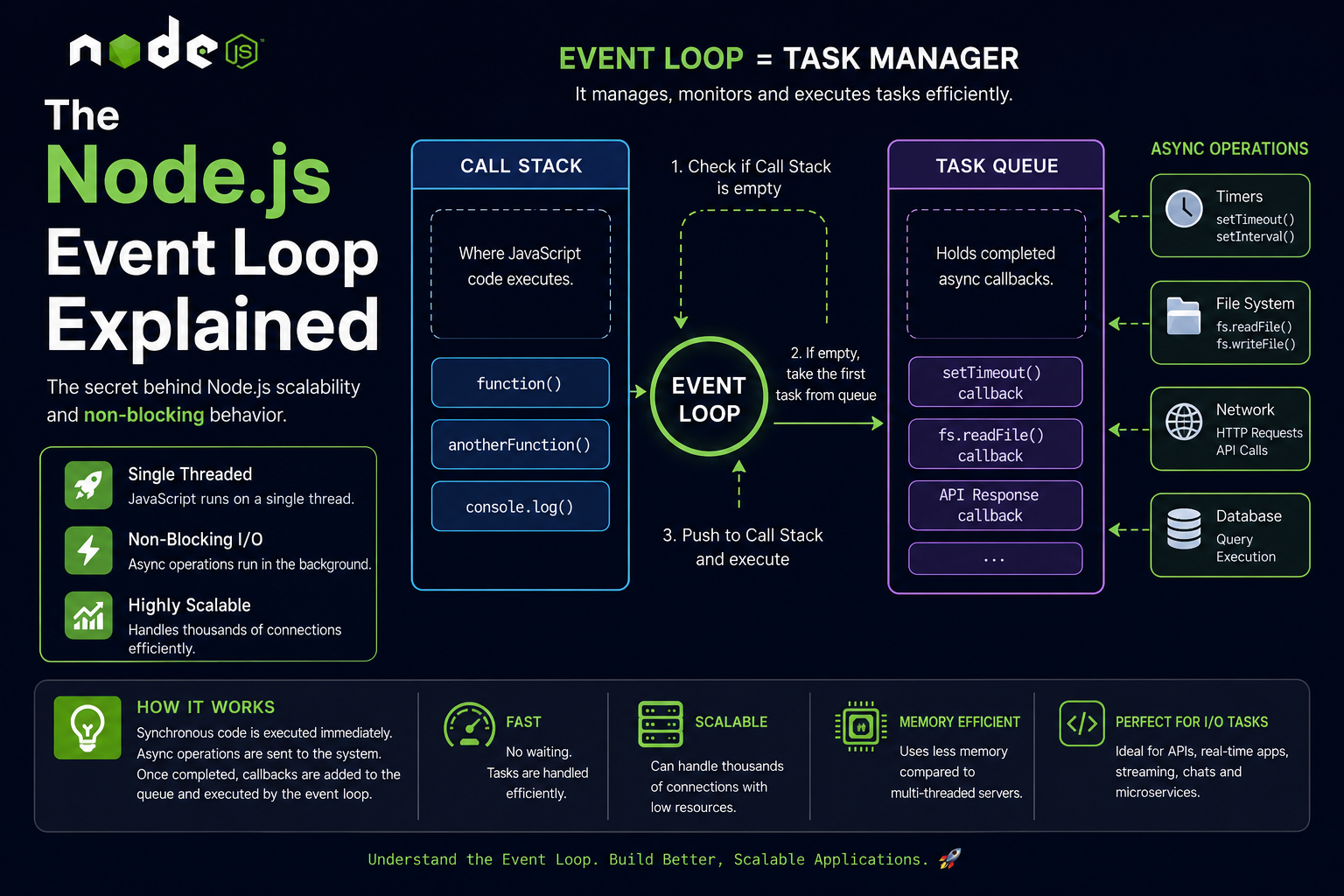
You can think of the Event Loop as a task manager.
It manages all asynchronous operations like:
File reading
Database queries
API requests
Timers
Network operations
without blocking the main thread.
Why Node.js Needs an Event Loop
Node.js is built on JavaScript.
And JavaScript is:
👉 Single-threaded
This means JavaScript can execute:
One task at a time
On a single main thread
Example:
console.log("Task 1");
console.log("Task 2");
console.log("Task 3");
Output:
Task 1
Task 2
Task 3
Each task waits for the previous one to finish.
The Problem Without an Event Loop
Imagine this code:
const fs = require("fs");

const data = fs.readFileSync("largeFile.txt");

console.log(data.toString());
console.log("Finished");
Here:
readFileSync()blocks the threadNode.js waits until the file is fully read
No other user requests can be handled
This is called:
❌ Blocking Operation
If 1000 users send requests simultaneously, the server becomes slow.
The Solution: Asynchronous Programming
Node.js solves this using:
✅ Async Operations + Event Loop
Example:
const fs = require("fs");

fs.readFile("largeFile.txt", (err, data) => {
    console.log(data.toString());
});

console.log("Finished");
Output:
Finished
(file content appears later)
Why?
Because:
File reading happens in the background
Node.js continues executing other tasks
When the file is ready, the callback is executed
This is managed by the Event Loop.
Understanding with a Real-Life Analogy 🍽️
Imagine a restaurant.
Chef = CPU
The chef can cook only one dish at a time.
Waiter = Event Loop
The waiter:
Takes orders
Gives them to the kitchen
Delivers completed dishes
Handles multiple customers efficiently
Even with one chef, the restaurant serves many customers smoothly.
Similarly:
JavaScript thread = Chef
Event Loop = Waiter
Async tasks = Orders
Core Components of the Event Loop
To understand the Event Loop, we need to know 3 important concepts:
Call Stack
Task Queue
Event Loop
1. Call Stack
The Call Stack is where JavaScript executes functions.
It follows:
👉 LIFO (Last In First Out)
Example:
function one() {
    two();
}

function two() {
    console.log("Hello");
}

one();
Execution:
Call Stack:

one()
two()
console.log()
Functions are pushed and popped from the stack.
2. Task Queue
Async callbacks do not directly enter the Call Stack.
Instead, completed async tasks wait inside:
👉 Task Queue
Examples:
setTimeout callbacks
File system callbacks
API responses
3. Event Loop
The Event Loop continuously checks:
Is Call Stack empty?
If YES:
Take first task from Task Queue
Push it into Call Stack
Execute it
This cycle repeats forever.
Event Loop Flow Diagram
          ┌─────────────┐
          │ Call Stack  │
          └──────┬──────┘
                 │
                 ▼
         ┌──────────────┐
         │ Event Loop   │
         └──────┬───────┘
                │
                ▼
         ┌──────────────┐
         │ Task Queue   │
         └──────────────┘
Event Loop Execution Cycle
1. Execute synchronous code
2. Async operations move to background
3. Completed callbacks enter queue
4. Event loop checks stack
5. If stack empty → execute queued callbacks
6. Repeat forever
Example 1: Understanding Execution Order
console.log("Start");

setTimeout(() => {
    console.log("Timer Finished");
}, 2000);

console.log("End");
Output:
Start
End
Timer Finished
Step-by-Step Explanation
Step 1
console.log("Start");
Executed immediately.
Step 2
setTimeout(...)
Timer starts in background.
Callback does NOT execute immediately.
Step 3
console.log("End");
Executes immediately.
Step 4
After 2 seconds:
Callback enters Task Queue
Event Loop checks Call Stack
Executes callback
Output:
Timer Finished
Important Point About setTimeout
Many beginners think:
setTimeout(fn, 2000)
means:
Execute exactly after 2 seconds
Wrong ❌
Correct meaning:
Execute AFTER AT LEAST 2 seconds, when Call Stack becomes empty.
How Async Operations are Handled
Node.js uses:
OS Kernel
Thread Pool (libuv)
Browser-like APIs
to handle async operations outside the main thread.
Examples:
| Operation | Handled By |
|---|---|
| File System | Thread Pool |
| Network Requests | OS |
| Timers | Timer APIs |
| Database Calls | External Systems |
When operations complete:
Callback goes to queue
Event Loop executes it later
Example 2: Async File Reading
const fs = require("fs");

console.log("1");

fs.readFile("demo.txt", "utf8", (err, data) => {
    console.log("2");
});

console.log("3");
Output:
1
3
2
Why?
Because file reading is asynchronous.
Timers vs I/O Callbacks
Both are asynchronous, but they behave differently.
Timers
Examples:
setTimeout()
setInterval()
These wait for:
- Time duration to complete
Example:
setTimeout(() => {
    console.log("Executed");
}, 1000);
I/O Callbacks
Examples:
File reading
Database operations
API requests
These wait for:
- External operation completion
Example:
fs.readFile("data.txt", () => {
    console.log("File Read");
});
High-Level Difference
| Timers | I/O Callbacks |
|---|---|
| Depend on time | Depend on external operations |
| Example: setTimeout | Example: fs.readFile |
| Triggered after delay | Triggered after completion |
Why Event Loop Makes Node.js Scalable
This is the MOST important advantage.
Traditional servers:
Create one thread per user
Threads consume memory
Too many users = heavy server load
Node.js:
✅ Uses non-blocking architecture
Instead of waiting:
Node.js delegates tasks
Continues serving other users
Handles thousands of connections efficiently
Example of Scalability
Imagine:
1000 users request data from a database.
Traditional approach:
1000 threads waiting
Huge memory usage
Node.js approach:
Single thread
Async requests
Event loop manages callbacks
Low memory usage
This is why companies like:
Netflix
PayPal
LinkedIn
use Node.js for scalable applications.
Common Misconception
❌ “Node.js is multithreaded”
Not exactly.
JavaScript execution is single-threaded.
But Node.js internally uses:
Thread pool
System workers
Async APIs
to perform background operations.
The Event Loop coordinates everything.
Visualizing Event Loop Execution
Synchronous Code
       │
       ▼
Call Stack Executes
       │
       ▼
Async Tasks Sent Away
       │
       ▼
Task Completes
       │
       ▼
Callback Added To Queue
       │
       ▼
Event Loop Checks Stack
       │
       ▼
Executes Callback
Real-World Example: Food Delivery App 🍕
Imagine ordering pizza.
Without Event Loop
Chef waits doing nothing until pizza bakes.
Very inefficient.
With Event Loop
Chef:
Starts baking pizza
Takes other orders meanwhile
Delivers pizza when ready
Efficient and scalable.
This is exactly how Node.js works.
Advantages of Event Loop
✅ Non-blocking
Does not wait unnecessarily.
✅ Fast
Handles multiple requests efficiently.
✅ Scalable
Supports thousands of users.
✅ Memory Efficient
Uses fewer threads.
Limitations of Event Loop
The Event Loop is great for:
- I/O-heavy tasks
But not ideal for:
❌ CPU-intensive tasks
Example:
Video processing
Heavy calculations
Image rendering
Because heavy computations block the single thread.
Example of Blocking Code
while(true) {
    // infinite loop
}
This blocks the Event Loop completely.
No other requests can be processed.
Best Practices
✅ Use asynchronous APIs
Prefer:
fs.readFile()
instead of:
fs.readFileSync()
✅ Avoid blocking operations
Heavy computations should use:
Worker Threads
Background services
✅ Keep callbacks lightweight
Long-running callbacks slow down the Event Loop.
Quick Summary
| Concept | Meaning |
|---|---|
| Call Stack | Executes functions |
| Task Queue | Stores completed async callbacks |
| Event Loop | Moves tasks to stack |
| Async Operations | Run in background |
| Node.js Scalability | Achieved through non-blocking execution |
Final Thoughts
The Event Loop is the heart of Node.js.
It allows JavaScript to:
Handle asynchronous operations
Serve multiple users efficiently
Build scalable backend applications
Understanding the Event Loop is essential for becoming a strong Node.js developer.
Once you master this concept, topics like:
Promises
Async/Await
Streams
APIs
WebSockets
become much easier to understand.
Conclusion
Node.js may be single-threaded, but thanks to the Event Loop, it can still handle massive workloads efficiently.
The Event Loop acts like a smart manager:
Delegating tasks
Monitoring completion
Executing callbacks
Keeping the application responsive
That’s the secret behind Node.js scalability 🚀