How React Virtual DOM Works Under the Hood: Render, Diffing & Reconciliation Explained
Introduction
Modern web applications update their user interface constantly — notifications appear instantly, buttons respond immediately, forms validate while typing, and dashboards refresh in real time.
If browsers had to rebuild the entire page for every tiny change, applications would feel slow and laggy.
This is exactly the problem React tries to solve using the Virtual DOM.
In this blog, we’ll understand:
Why direct DOM manipulation is slow
What the Virtual DOM actually is
How React renders UI
What happens when state changes
How React compares changes using diffing (reconciliation)
How React updates only the necessary parts of the page
Why this approach improves performance
By the end, you’ll have a clear mental model of how React works internally — without diving into complex Fiber internals.
The Problem: Direct DOM Manipulation is Expensive
Before React, developers updated the UI directly using JavaScript.
Example:
<p id="text">Hello</p>

<script>
  document.getElementById("text").innerText = "Hello Vishal";
</script>
This seems simple.
But imagine a large application containing:
Thousands of HTML elements
Complex nested structures
Frequent updates
Animations
Live data
Every DOM update forces the browser to perform expensive operations like:
Recalculating layout
Repainting pixels
Re-rendering sections of the page
These operations are computationally expensive.
Frequent direct DOM manipulation can make applications slow.
What is the Real DOM?
The Real DOM is the actual tree structure created by the browser.
Example HTML:
<div>
  <h1>Hello</h1>
  <p>Welcome</p>
</div>
Browser converts this into a DOM tree:
div
 ├── h1
 │    └── Hello
 └── p
      └── Welcome
The browser uses this structure to display the webpage.
Why Real DOM Updates Are Slow
Changing even a small part of the DOM may trigger:
Reflow (layout recalculation)
Repaint (redrawing)
Recomposition
Example:
document.getElementById("title").style.color = "red";
Even this tiny update can affect surrounding elements.
Now imagine hundreds of updates happening repeatedly.
Performance becomes a problem.
Introducing the Virtual DOM
React solves this problem using the Virtual DOM.
The Virtual DOM is:
A lightweight JavaScript representation of the Real DOM
Stored in memory
Faster to create and compare
Instead of updating the browser DOM directly, React:
Creates a Virtual DOM tree
Detects changes
Updates only necessary parts in the Real DOM
Real DOM vs Virtual DOM
| Real DOM | Virtual DOM |
|---|---|
| Actual browser DOM | Lightweight JS object |
| Slow to update | Fast to update |
| Causes reflow/repaint | No direct browser rendering |
| Manipulated directly | Compared in memory |
| Expensive operations | Efficient diffing |
Initial Render Process in React
Let’s understand what happens when a React app loads for the first time.
Example:
function App() {
  return <h1>Hello React</h1>;
}
Step 1: React Creates Virtual DOM
React converts JSX into JavaScript objects.
Conceptually:
{
  type: "h1",
  props: {
    children: "Hello React"
  }
}
This object becomes part of the Virtual DOM tree.
Step 2: Virtual DOM Tree is Built
React creates a complete tree structure.
App
 └── h1
      └── Hello React
Step 3: React Creates Real DOM
React converts the Virtual DOM into actual browser DOM elements.
Browser finally displays:
<h1>Hello React</h1>
Diagram: Initial Render Flow
React Component
       ↓
Virtual DOM Created
       ↓
React Builds DOM Tree
       ↓
Real DOM Updated
       ↓
UI Appears on Screen
What Happens When State Changes?
Now comes the most important part.
Example:
function Counter() {
  const [count, setCount] = useState(0);

  return (
    <div>
      <h1>{count}</h1>
      <button onClick={() => setCount(count + 1)}>
        Increment
      </button>
    </div>
  );
}
When the button is clicked:
setCount(count + 1);
React starts the update process.
Step-by-Step Re-render Process
Step 1: State Change Triggers Re-render
React notices:
"State has changed."
So React re-renders the component function.
Step 2: New Virtual DOM Tree is Created
Old Virtual DOM:
div
 ├── h1 → 0
 └── button
New Virtual DOM:
div
 ├── h1 → 1
 └── button
React now has:
Old tree
New tree
What is Diffing?
React compares:
Previous Virtual DOM tree
New Virtual DOM tree
This comparison process is called:
Reconciliation (Diffing)
The goal is simple:
Find the smallest possible changes needed.
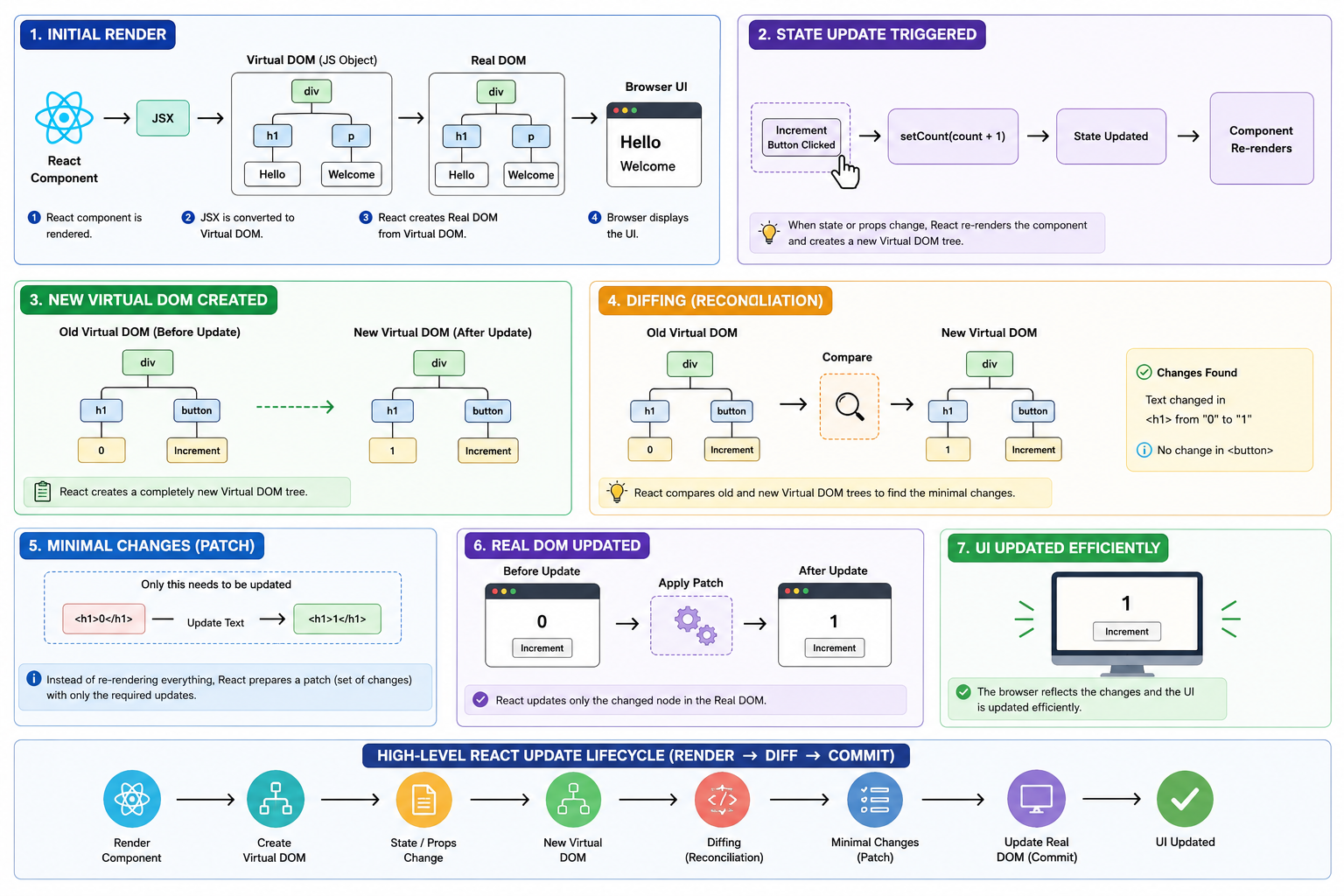
Diagram: Diffing Process
Old Virtual DOM          New Virtual DOM

div                       div
 ├── h1 → 0        VS      ├── h1 → 1
 └── button                 └── button
React detects:
✅ Only the text inside <h1> changed.
How React Finds Minimal Changes
React uses efficient comparison rules.
Rule 1: Different Element Type
If element types differ:
<div> → <span>
React removes old node and creates a new one.
Rule 2: Same Element Type
If type is same:
<h1> → <h1>
React updates only changed attributes/content.
Rule 3: Compare Children
React recursively compares child elements.
This makes updates efficient.
Updating Only Changed Nodes
Instead of rebuilding the entire page:
❌ Bad Approach:
Delete everything
Rebuild everything
✅ React Approach:
Update only changed node
In our counter example:
Only this updates:
<h1>0</h1>
becomes:
<h1>1</h1>
Button remains untouched.
Why This Improves Performance
This approach improves performance because:
1. Fewer Real DOM Operations
Real DOM manipulation is expensive.
React minimizes it.
2. Faster Comparisons in Memory
Comparing JavaScript objects is fast.
Updating browser UI is slower.
3. Efficient UI Updates
Only necessary elements change.
Everything else stays unchanged.
4. Better User Experience
Applications feel:
Faster
Smoother
More responsive
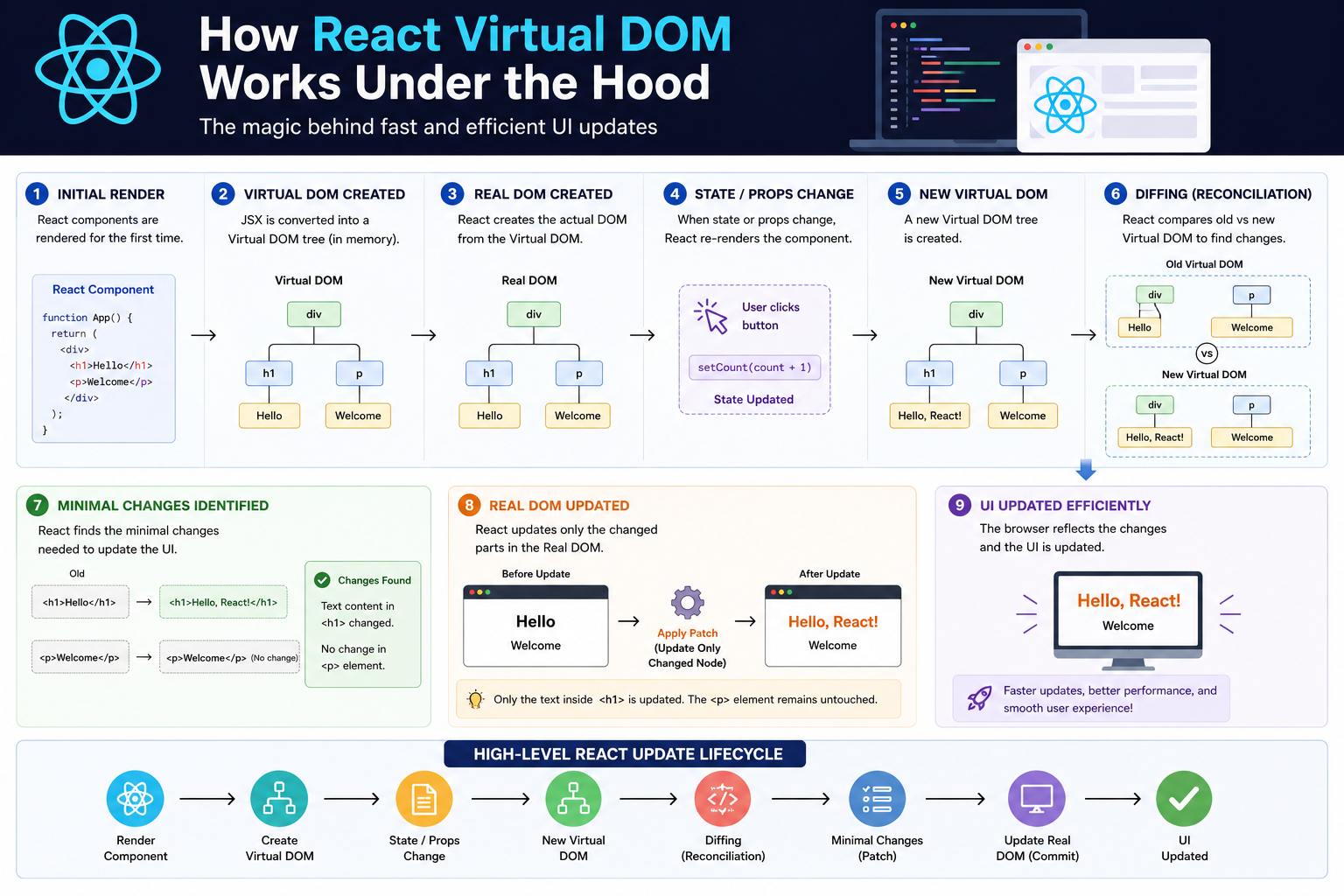
High-Level React Update Flow
Here’s the complete lifecycle:
Component Render
       ↓
Virtual DOM Created
       ↓
State/Props Change
       ↓
New Virtual DOM Created
       ↓
Diffing (Reconciliation)
       ↓
Minimal Changes Identified
       ↓
Real DOM Updated
       ↓
UI Updated Efficiently
Simple Mental Model
Think of React like a proofreader.
Instead of rewriting an entire book for one spelling mistake:
React compares old version vs new version
Finds only changed words
Updates only those parts
That’s exactly how Virtual DOM works.
Important Clarification
Many beginners think:
“Virtual DOM is faster than Real DOM.”
Not exactly.
The browser DOM itself is highly optimized.
The real advantage is:
✅ React reduces unnecessary DOM operations.
That optimization is what improves performance.
Does React Update the Entire Virtual DOM?
Yes.
Whenever state changes:
- React creates a new Virtual DOM tree for the component
But this is cheap because:
Virtual DOM objects are lightweight
Comparison happens in memory
The expensive Real DOM updates are minimized.
Key Takeaways
React Virtual DOM:
Is a lightweight copy of the Real DOM
Exists in memory
Helps React detect UI changes efficiently
React Workflow:
Render component
Create Virtual DOM
State changes
Create new Virtual DOM
Compare old vs new tree
Find minimal changes
Update only changed Real DOM nodes
Main Benefit:
✅ Better performance through minimal DOM updates.
Conclusion
React’s Virtual DOM is one of the biggest reasons React applications feel fast and responsive.
Instead of directly manipulating the browser DOM repeatedly, React:
Creates Virtual DOM trees
Compares changes intelligently
Updates only necessary parts of the UI
This process — called reconciliation — allows React to efficiently manage complex interfaces without unnecessary rendering costs.
Understanding this mental model helps developers write better React applications and understand how React behaves during rendering and updates.