How Node.js Handles Multiple Requests with a Single Thread 🚀
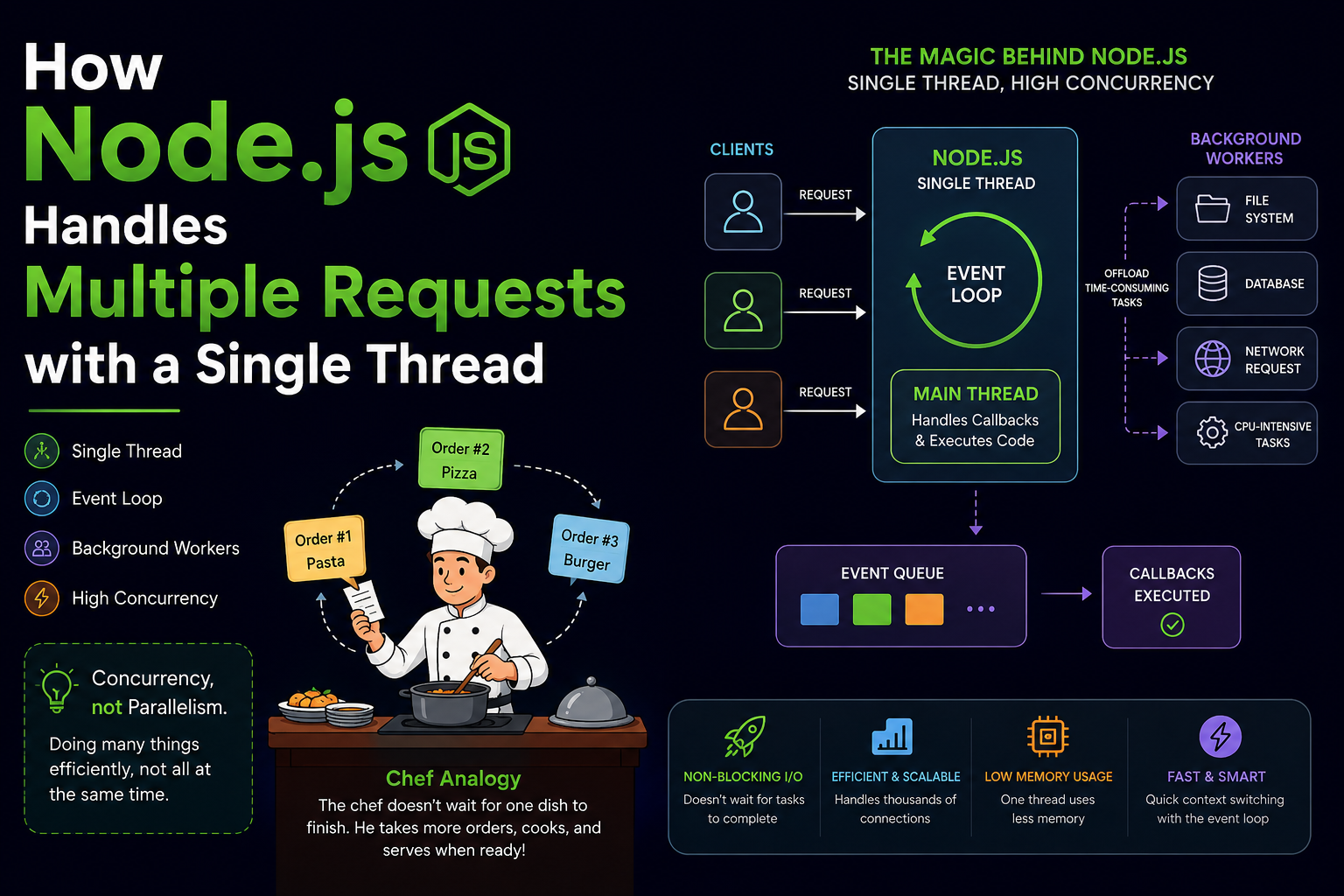
When beginners first hear that Node.js is single-threaded, the first question they ask is:
“If Node.js uses only one thread, then how can it handle thousands of users at the same time?”
That sounds impossible, right?
But this is exactly what makes Node.js powerful.
In this blog, we’ll understand:
What “single-threaded” actually means
Difference between a thread and a process
How the Event Loop works
How Node.js handles multiple client requests
Background workers in Node.js
Why Node.js scales so well
Real-world analogy for easy understanding
Let’s dive in 🔥
What is Node.js?
Node.js is a JavaScript runtime built on Chrome’s V8 engine.
It allows JavaScript to run outside the browser.
Node.js is mainly used for:
Web servers
APIs
Real-time applications
Chat applications
Streaming platforms
Understanding Thread vs Process 🧠
Before understanding Node.js, we need to understand two important terms.
What is a Process?
A process is an independent program running in memory.
Examples:
Chrome browser
VS Code
Spotify
Each process has:
Its own memory
Resources
Execution environment
What is a Thread?
A thread is a smaller unit of execution inside a process.
A process can have:
One thread
Multiple threads
Example
Imagine a restaurant.
The restaurant = Process
Workers inside = Threads
If there is:
One worker → Single-threaded
Multiple workers → Multi-threaded
Node.js is Single-Threaded ⚡
Node.js uses:
One main thread
One event loop
This single thread handles:
Incoming requests
Executing JavaScript code
Managing callbacks
At first glance, this looks slow.
But Node.js becomes powerful because of non-blocking asynchronous programming.
The Biggest Misunderstanding ❌
Many people think:
“Single-threaded means it can handle only one user at a time.”
That is WRONG.
Node.js handles multiple requests concurrently, not sequentially.
The key word is:
Concurrency ≠ Parallelism
Parallelism
Multiple tasks run at the exact same time.
Example:
- 4 cooks cooking 4 dishes simultaneously.
Concurrency
One worker efficiently switches between tasks.
Example:
- One chef taking multiple orders smartly.
Node.js focuses mainly on concurrency.
Chef Analogy 🍳
Imagine a chef in a restaurant.
The chef:
Takes an order
Puts food in oven
While food cooks, takes another order
Serves completed dishes later
The chef does NOT:
- Stand idle waiting for food to cook
This is exactly how Node.js works.
How Node.js Handles Multiple Requests
Let’s say 3 users send requests to a server.
Traditional Blocking Server
Request 1 → Process completely
Request 2 → Wait
Request 3 → Wait
Very slow ❌
Node.js Non-Blocking Server
Request 1 → Start DB query
Request 2 → Handle immediately
Request 3 → Handle immediately
Fast and efficient ✅
The Secret Weapon: Event Loop 🔄
The Event Loop is the heart of Node.js.
It continuously checks:
Is some task completed?
Is any callback ready?
Is there work pending?
Then it executes the appropriate callback.
Event Loop Flow Diagram
 ┌───────────────┐
 │ Client Request│
 └──────┬────────┘
        │
        ▼
 ┌───────────────┐
 │ Event Queue   │
 └──────┬────────┘
        │
        ▼
 ┌───────────────┐
 │ Event Loop    │
 └──────┬────────┘
        │
        ▼
 ┌───────────────┐
 │ Main Thread   │
 └──────┬────────┘
        │
        ▼
 ┌──────────────────┐
 │ Background Worker│
 └──────────────────┘
Delegating Tasks to Background Workers ⚙️
Some tasks take time:
File reading
Database operations
API calls
Cryptography
Compression
Node.js does NOT perform these on the main thread.
Instead, it delegates them to:
OS kernel
Thread pool (libuv workers)
This keeps the main thread free.
What is libuv?
libuv is a library used internally by Node.js.
It provides:
Event loop
Thread pool
Async I/O operations
By default:
- Thread pool size = 4
Step-by-Step Request Handling
Suppose a user requests data from database.
Step 1
Client sends request.
app.get('/users', async (req, res) => {
  const users = await getUsersFromDB();
  res.send(users);
});
Step 2
Node.js starts database operation.
Instead of waiting:
- It sends DB task to background system.
Step 3
Main thread becomes free.
Node.js handles other incoming requests.
Step 4
When DB operation finishes:
- Callback enters queue.
Step 5
Event loop executes callback.
Response is sent to client.
Real Example of Non-Blocking Nature
Blocking Code ❌
const fs = require('fs');

const data = fs.readFileSync('file.txt');

console.log(data.toString());

console.log('Done');
Problem:
- Entire server waits until file is read.
Non-Blocking Code ✅
const fs = require('fs');

fs.readFile('file.txt', (err, data) => {
    console.log(data.toString());
});

console.log('Done');
Output:
Done
[file content]
Why?
Because file reading happens asynchronously.
Single Thread Handling Multiple Requests Diagram
Clients
   │
   ▼
┌───────────┐
│ Node.js   │
│ MainThread│
└─────┬─────┘
      │
      ▼
┌────────────┐
│ Event Loop │
└─────┬──────┘
      │
 ┌────┴─────┐
 ▼          ▼
DB Task   File Task
 ▼          ▼
Workers   Workers
Why Node.js Scales So Well 📈
Node.js is highly scalable because:
1. Non-Blocking I/O
It doesn’t wait for tasks to finish.
2. Efficient Memory Usage
One thread uses less memory.
3. Handles Thousands of Connections
Perfect for:
Chat apps
Streaming apps
APIs
Real-time systems
4. Fast Context Switching
No heavy thread management.
Where Node.js is Best Used
Node.js is excellent for:
✅ REST APIs ✅ Chat applications ✅ Real-time apps ✅ Streaming services ✅ Multiplayer games ✅ Microservices
Where Node.js is NOT Ideal
CPU-heavy operations can block the main thread.
Examples:
Video rendering
Machine learning
Large calculations
In such cases:
Worker Threads
Child Processes
Other backend languages may help
Worker Threads in Modern Node.js
Modern Node.js also supports Worker Threads.
These allow actual parallel execution.
Example:
const { Worker } = require('worker_threads');
Useful for:
- CPU-intensive tasks
Quick Summary 📝
| Concept | Explanation |
|---|---|
| Single Thread | One main JavaScript thread |
| Concurrency | Managing many tasks together |
| Parallelism | Multiple tasks at same time |
| Event Loop | Handles async callbacks |
| libuv | Provides async operations |
| Non-Blocking I/O | Server doesn’t wait |
| Scalability | Handles many users efficiently |
Final Thoughts 💡
Node.js changed backend development by proving that:
“A single-threaded system can still handle massive traffic efficiently.”
The magic lies in:
Event Loop
Asynchronous programming
Background workers
Non-blocking I/O
Instead of creating many threads, Node.js smartly manages tasks using concurrency.
That’s why companies like:
Netflix
PayPal
LinkedIn
Uber
use Node.js for scalable applications.
Conclusion 🎯
Node.js may be single-threaded, but it is far from weak.
By using:
Event Loop
Async programming
Background workers
it can efficiently handle thousands of concurrent requests.
The next time someone says:
“Node.js has only one thread.”
You can confidently say:
“Yes, but it handles concurrency brilliantly.” 🚀
#NodeJS #JavaScript #BackendDevelopment #WebDevelopment #EventLoop #AsyncProgramming #Programming #NodeJSTutorial